Python Task Queue Without Redis
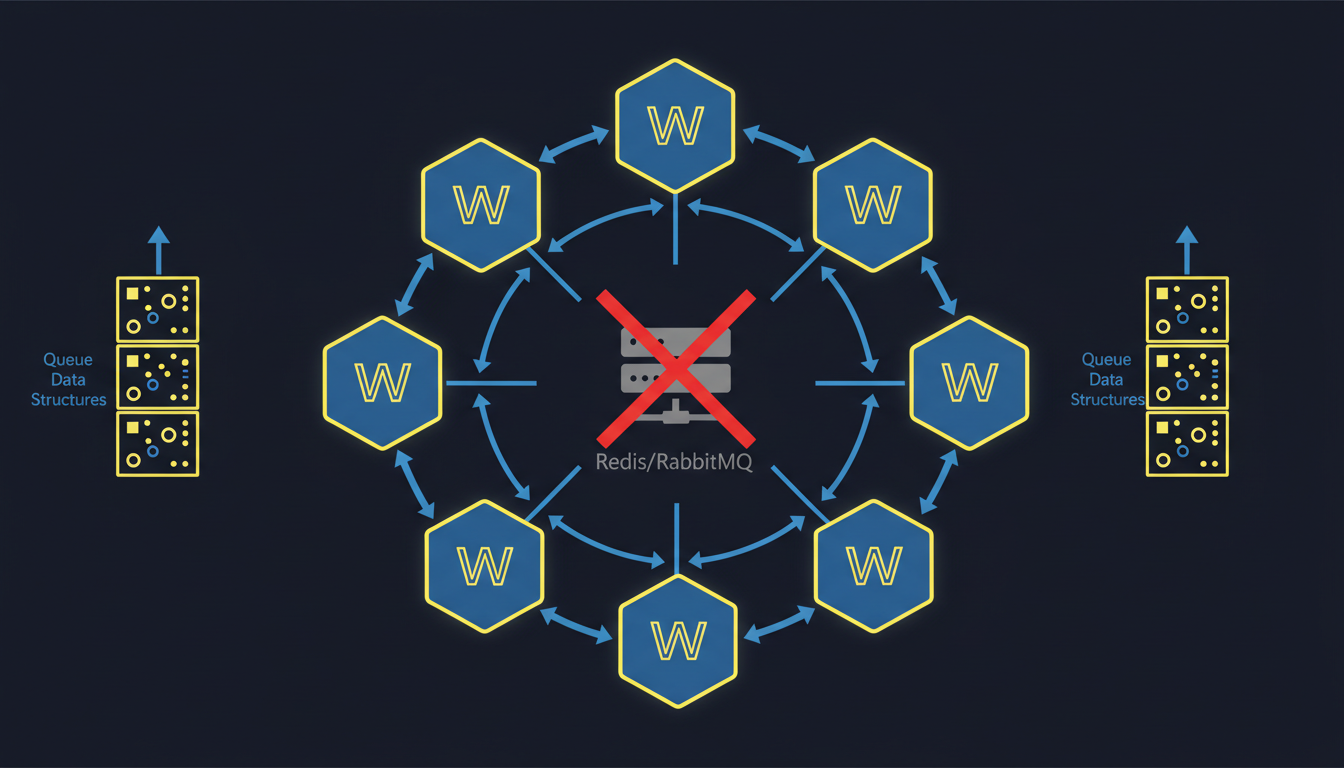
FastWorker is an open-source (MIT) brokerless task queue for Python 3.12+ that eliminates Redis, RabbitMQ, and external brokers entirely. It uses a built-in control plane for task distribution, supports priority queues, auto-discovery, result caching, FastAPI integration, and OpenTelemetry tracing. Designed for moderate-scale apps processing 1K-10K tasks/min. Install with pip install fastworker.
Quick Comparison: FastWorker vs Celery + Redis
| Feature | Celery + Redis | FastWorker |
|---|---|---|
| External broker required | Yes (Redis or RabbitMQ) | No |
| Minimum processes | 3 (broker + worker + app) | 2 (control plane + app) |
| Priority queues | Limited (separate queues) | Native (critical/high/normal/low) |
| Monitoring dashboard | Flower (separate install) | Built-in web UI |
| Worker discovery | Manual configuration | Automatic on network |
| Result backend | Requires separate config | Built-in with TTL |
| Distributed tracing | Manual setup | OpenTelemetry built-in |
| Target throughput | 10K+ tasks/min | 1K-10K tasks/min |
| Python version | 3.8+ | 3.12+ |
| Install | pip install celery redis | pip install fastworker |
Source: github.com/neul-labs/fastworker | License: MIT
The Problem: Too Many Moving Parts for Background Tasks
The standard Python background task setup requires at least four components:
| Component | What It Does | Operational Overhead |
|---|---|---|
| Redis or RabbitMQ | Message broker | Memory management, persistence config, monitoring, backups |
| Celery or Dramatiq | Worker framework | Configuration, serialization format, concurrency settings |
| Flower | Monitoring dashboard | Separate process, authentication, port management |
| Supervisor/systemd | Process management | Service files, restart policies, log rotation |
For a simple requirement like “process this document in the background,” you’re managing 4+ processes with independent configuration, monitoring, and failure modes.
This complexity is justified at massive scale (100K+ tasks/min across dozens of machines). But for the majority of Python applications — web backends, data pipelines, API services processing 1K-10K tasks per minute — it’s over-engineering.
How FastWorker Eliminates the Broker
FastWorker uses a Control Plane Architecture that replaces the external broker with a built-in coordinator:
Architecture
┌─────────────┐     ┌──────────────┐     ┌─────────────┐
│   Client     │────>│ Control Plane │<────│ Subworker 1 │
│  (your app)  │     │  (coordinator)│<────│ Subworker 2 │
└─────────────┘     └──────────────┘     └─────────────┘
                          │
                    ┌─────┴──────┐
                    │  Dashboard  │
                    │ (built-in)  │
└────────────┘- Control Plane: Central coordinator that manages task distribution, priority ordering, result caching, and the monitoring dashboard. This is the only required process beyond your application.
- Subworkers: Optional additional processing units that register dynamically with the control plane. Workers discover the control plane automatically on the network.
- Client: Your application submits tasks to the control plane. Works from Python async code, blocking calls, or the CLI.
Communication
FastWorker uses pynng (nanomsg) for inter-process communication instead of Redis pub/sub. This provides:
- Zero external dependencies (nanomsg is compiled into the Python package)
- Lower latency than Redis for local communication
- Automatic reconnection on network failures
Getting Started
1. Install
pip install fastworker # Requires Python 3.12+2. Define Tasks
from fastworker import task

@task(priority="normal")
async def process_document(doc_id: str) -> dict:
    """Process a document in the background."""
    result = await heavy_processing(doc_id)
    return {"status": "processed", "doc_id": doc_id}

@task(priority="critical")
async def send_notification(user_id: str, message: str) -> dict:
    """Critical tasks are processed before normal tasks."""
    await notify_user(user_id, message)
    return {"status": "sent"}
3. Start the Control Plane
# Start control plane (includes dashboard at http://localhost:8000)
fastworker start

# Optionally add subworkers for more processing capacity
fastworker worker start
4. Submit Tasks
# From async code
result = await process_document.submit("doc-abc123")

# From sync code
result = process_document.submit_sync("doc-abc123")
# From CLI
fastworker submit process_document --args '{"doc_id": "doc-abc123"}'Key Features
Priority Queues
FastWorker supports four priority levels, processed in order:
| Priority | Use Case | Example |
|---|---|---|
| critical | Must process immediately | Payment webhooks, security alerts |
| high | Time-sensitive | Email sending, notifications |
| normal | Standard background work | Document processing, report generation |
| low | Can wait indefinitely | Analytics, data cleanup |
Tasks are always dequeued in priority order. A critical task submitted after 100 normal tasks will be processed next.
Auto-Discovery
Workers find the control plane automatically using network broadcast. No manual configuration of broker URLs:
# On machine A: start control plane
fastworker start

# On machine B: start worker (auto-discovers control plane)
fastworker worker start
Built-In Dashboard
The control plane includes a real-time web monitoring dashboard (no Flower, no separate install):
- Active and queued task counts by priority
- Worker status and processing rates
- Task result history with filtering
- Error rates and failure details
FastAPI Integration
from fastapi import FastAPI
from fastworker.integrations.fastapi import FastWorkerMiddleware

app = FastAPI()
app.add_middleware(FastWorkerMiddleware)

@app.post("/documents/{doc_id}/process")
async def process_doc(doc_id: str):
    task_id = await process_document.submit(doc_id)
    return {"task_id": task_id, "status": "queued"}
OpenTelemetry Tracing
Distributed tracing is built in. Task submission, execution, and completion are automatically instrumented with OpenTelemetry spans:
# Traces propagate automatically from HTTP request → task submission → task execution
# No manual instrumentation needed
When to Use FastWorker (and When Not To)
Use FastWorker when:
- Your application processes 1K-10K tasks per minute
- You want to avoid managing Redis/RabbitMQ infrastructure
- You need priority queues without complex Celery routing
- You want built-in monitoring without Flower
- You’re building a FastAPI application with background tasks
- You’re deploying to a single server or small cluster
Consider Celery + Redis when:
- You need 100K+ tasks per minute sustained throughput
- You have dozens of worker machines across multiple regions
- You need complex routing patterns (topic exchanges, headers matching)
- You require exactly-once delivery guarantees with Redis Streams
- You’re already running Redis for caching and want to consolidate
Technical Specifications
| Specification | Value |
|---|---|
| Python version | 3.12+ |
| Dependencies | pynng, pydantic |
| Protocol | nanomsg (REQ/REP, PUB/SUB) |
| Task serialization | JSON via pydantic |
| Result storage | In-memory with configurable TTL |
| Max throughput | ~10K tasks/min (single control plane) |
| Worker scaling | Dynamic registration, auto-discovery |
| License | MIT |
Documentation: docs.neullabs.com/fastworker Source: github.com/neul-labs/fastworker
FastWorker is part of our Developer Tools suite. For other Rust-accelerated tools, check out our Performance Accelerators for AI frameworks and Agent Infrastructure for multi-agent orchestration.
Frequently Asked Questions
What is the best Python task queue without Redis?
FastWorker is a brokerless Python task queue that requires no external message broker. It replaces Redis, RabbitMQ, Celery, and Flower with a single package: pip install fastworker. It supports priority queues, auto-discovery, result caching, and a built-in monitoring dashboard.
Can FastWorker replace Celery?
For applications processing 1K-10K tasks per minute, yes. FastWorker provides priority queues, distributed workers, result caching, monitoring, and FastAPI integration — all features that typically require Celery + Redis + Flower. For higher throughput (100K+ tasks/min) or complex routing patterns, Celery + Redis remains the better choice.
Does FastWorker support distributed workers across multiple machines?
Yes. Subworkers discover the control plane automatically via network broadcast. Start fastworker worker start on any machine on the same network, and it will register with the control plane and begin processing tasks.
How does FastWorker handle task failures?
Failed tasks are recorded with their exception details and can be retried manually or automatically based on configuration. The built-in dashboard shows failure rates and error details for debugging.
Is FastWorker production-ready?
FastWorker is MIT licensed and designed for production use in moderate-scale applications. It’s used in production by Neul Labs for internal services. For mission-critical, high-throughput workloads, evaluate your throughput needs against the 10K tasks/min target.
Does FastWorker work with Django?
FastWorker’s core API is framework-agnostic. While it has first-class FastAPI integration, you can use it with Django by submitting tasks from Django views using the sync API (task.submit_sync()). A dedicated Django integration is on the roadmap.
How does FastWorker compare to Dramatiq?
Dramatiq is a lighter alternative to Celery but still requires an external broker (Redis or RabbitMQ). FastWorker eliminates the broker entirely. Dramatiq has higher throughput potential due to its broker-backed architecture; FastWorker trades maximum throughput for operational simplicity.
Related Products
Related Articles
PyO3 in Production: What We Learned
Packaging, ABI choices, GIL handling, error mapping and monkeypatch safety: the decisions behind shipping Rust extensions to Python users.
The GIL Ceiling in Python AI Frameworks
Why LiteLLM, LangGraph and CrewAI stop scaling before the network does, what the GIL actually serialises, and how to tell a GIL wall from an I/O wall.
Why Rust Accelerates Python AI Infrastructure
The GIL and single-threaded serialization bottleneck production AI agents. Rust with PyO3 gives drop-in replacements for LiteLLM, LangGraph and CrewAI.