Running AI Coding Agents in Parallel
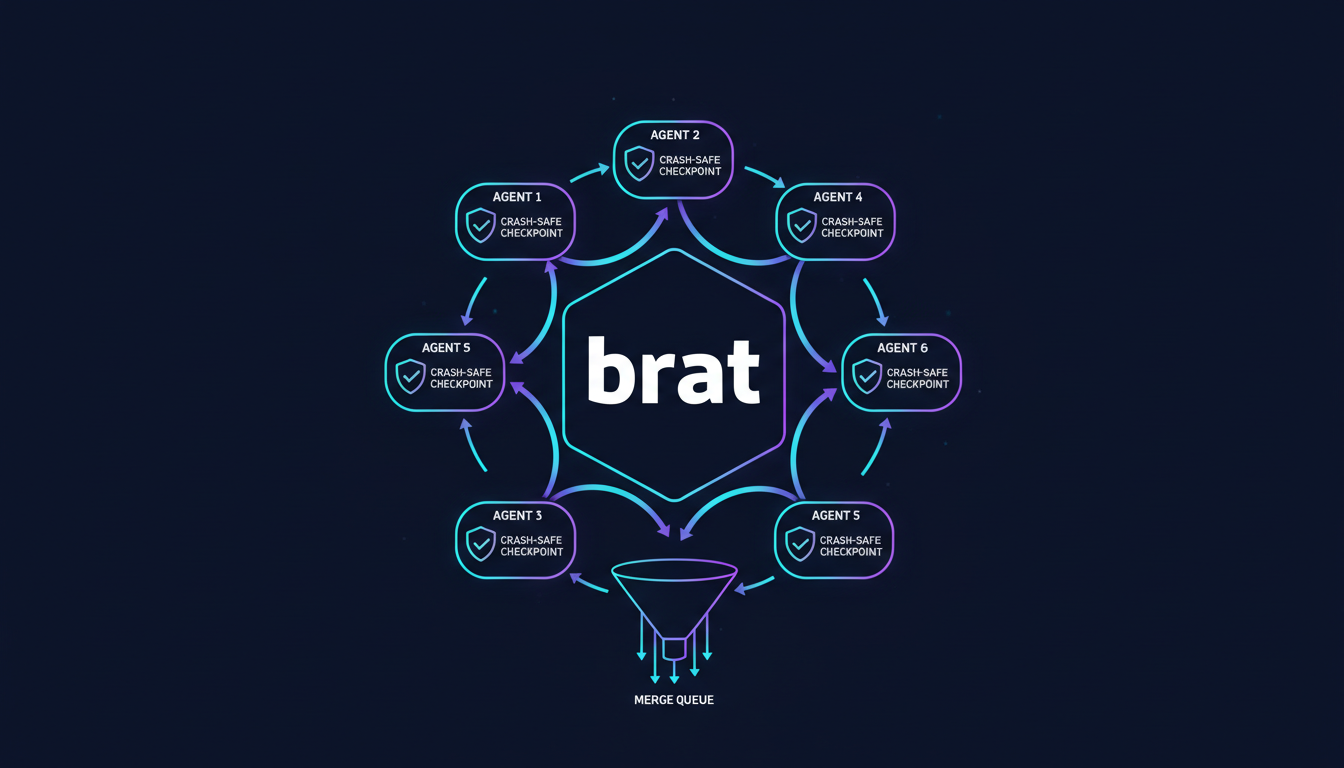
brat is an open-source (MIT) multi-agent harness that lets you run Claude Code, Aider, Codex, and other AI coding agents in parallel on the same codebase. It provides crash-safe state management via an append-only event log, automatic task decomposition, configurable merge policies, and a real-time web dashboard. Install with cargo install brat.
Quick Reference
| Feature | Details |
|---|---|
| What it does | Coordinates multiple AI coding agents working in parallel on shared codebases |
| Supported agents | Claude Code, Aider, OpenCode, Codex, Continue, Gemini, GitHub Copilot |
| State management | Crash-safe append-only event log (Grite) |
| Merge strategies | Rebase, squash, merge — configurable per convoy |
| Dashboard | Real-time web UI at localhost:5173 |
| Install | cargo install brat |
| License | MIT |
| Source | github.com/neul-labs/brat |
The Problem: AI Coding Agents Work Sequentially
Most developers today use one AI coding agent at a time. The typical workflow looks like:
- Ask Claude Code to refactor a module — wait 5-15 minutes
- Ask Aider to write tests for the refactored module — wait 5-10 minutes
- Ask Codex to update documentation — wait 3-5 minutes
Total: 13-30 minutes of sequential waiting for work that could largely happen in parallel.
The core issue: Many subtasks in a large coding project are independent. Different modules, different test files, different documentation pages. There’s no technical reason they can’t be worked on simultaneously by different agents — but until now, there was no reliable way to coordinate this.
What brat Does
brat is a multi-agent orchestration harness that:
- Decomposes tasks into parallelizable subtasks using an AI orchestrator (the “Mayor”)
- Assigns subtasks to different AI coding agents based on their strengths
- Manages state via a crash-safe append-only event log
- Handles merges through a configurable merge queue with CI integration
- Provides visibility through a real-time web dashboard
Architecture: Mayor-Convoy-Task Model
| Component | Role | Analogy |
|---|---|---|
| Mayor | AI orchestrator that analyzes the codebase and decomposes work into tasks | Project manager |
| Convoy | Group of related tasks sharing a feature branch | Sprint / epic |
| Task | Individual work item assigned to a specific coding agent | Ticket |
| Witness | Process that spawns, monitors, and manages agent sessions | Process supervisor |
| Refinery | Merge queue that integrates completed work with configurable policies | CI/CD pipeline |
Crash-Safe State with Grite
All coordination state lives in an append-only event log powered by Grite, Neul Labs’ repository-native event store. Key properties:
- Deterministic recovery: If any agent or the orchestrator crashes, the system replays the event log to restore exact state
- No external dependencies: State lives in the repository itself — no databases, no message brokers
- Audit trail: Every assignment, completion, and merge is recorded immutably
Supported AI Coding Engines
brat supports all major AI coding tools through a pluggable engine interface:
| Engine | Integration Type | Best For |
|---|---|---|
| Claude Code | Native (Anthropic API) | Architecture, complex refactoring |
| Aider | CLI wrapper | Multi-model support, edit formats |
| OpenCode | CLI wrapper | 75+ LLM providers |
| Codex | CLI wrapper | OpenAI ecosystem |
| Continue | IDE protocol | IDE-integrated workflows |
| Gemini | API | Google ecosystem |
| GitHub Copilot | CLI wrapper | GitHub-native workflows |
You can assign different engines to different task types. For example, use Claude Code for architectural decisions and Aider for mechanical test writing.
Getting Started
1. Install
cargo install brat2. Configure
# .brat/config.toml

[engine.default]
type = "claude-code"

[engine.tests]
type = "aider"
model = "gpt-4o"

[engine.docs]
type = "codex"

[refinery]
strategy = "squash"     # rebase | squash | merge
require_ci = true
3. Run
# Initialize brat in your repository
brat init

# Start the Mayor with a high-level task
brat mayor start --task "Refactor the auth module to use JWT tokens, update all tests, and update API documentation"

# Launch the Witness to spawn and monitor agents
brat witness run
4. Monitor
Open localhost:5173 for the real-time web dashboard showing:
- Active agents and their current tasks
- Git branch status for each convoy
- Merge queue and CI check status
- Event log timeline
Example Workflow
Given the task “Refactor auth module to use JWT tokens,” the Mayor might decompose it into:
| Task | Assigned Engine | Branch |
|---|---|---|
Implement JWT token generation in auth/tokens.py | Claude Code | convoy/auth-jwt/task-1 |
| Implement JWT verification middleware | Claude Code | convoy/auth-jwt/task-2 |
| Update user login endpoint to return JWT | Claude Code | convoy/auth-jwt/task-3 |
| Write unit tests for token generation | Aider (gpt-4o) | convoy/auth-jwt/task-4 |
| Write integration tests for JWT middleware | Aider (gpt-4o) | convoy/auth-jwt/task-5 |
| Update API docs for auth endpoints | Codex | convoy/auth-jwt/task-6 |
Tasks 1-3 may run sequentially (dependency chain), while tasks 4-6 can run in parallel once their dependencies complete. Refinery merges everything back when CI passes.
When to Use brat
Good fit:
- Large refactoring tasks touching many files
- Projects where testing, implementation, and documentation can be parallelized
- Teams already using multiple AI coding tools
- Tasks with clear decomposition boundaries (different modules, different file types)
Not ideal for:
- Small, single-file changes
- Tasks requiring deep cross-module reasoning that can’t be decomposed
- Projects with a single developer who prefers interactive agent sessions
Frequently Asked Questions
Can I run Claude Code and Aider on the same codebase simultaneously?
Yes, that’s exactly what brat is designed for. brat assigns each agent to a separate git branch and manages merges through the Refinery. Agents never directly conflict because they work on isolated branches.
What happens if an agent crashes mid-task?
brat’s state is stored in an append-only event log (Grite). When an agent crashes, the Witness process detects the failure, records it in the log, and can restart the task from the last known state. No work is lost and no state is corrupted.
Does brat require all agents to be installed locally?
Yes, brat orchestrates agents that run on your local machine (or a CI runner). Each engine you configure in .brat/config.toml must be installed and authenticated. brat handles spawning and monitoring.
How does brat decide which tasks can run in parallel?
The Mayor analyzes task descriptions and file paths to build a dependency graph. Tasks that touch different files or modules are marked as parallelizable. Tasks with explicit dependencies (e.g., “write tests for module X” depends on “implement module X”) are ordered sequentially.
Can I use brat in CI/CD pipelines?
Yes. brat can run headless (without the web dashboard) in CI environments. Use brat mayor start --headless to run the full orchestration pipeline and exit with a status code indicating success or failure.
How does brat compare to multi-agent frameworks like CrewAI or AutoGen?
brat is specifically designed for coding agents (Claude Code, Aider, Codex) rather than general-purpose LLM agents. It focuses on git-native workflows: branch management, merge queues, and CI integration. CrewAI and AutoGen orchestrate LLM conversations; brat orchestrates code changes.
Is brat open source?
Yes. brat is MIT licensed and available at github.com/neul-labs/brat. Contributions are welcome.
brat is part of our Agent Infrastructure suite. To learn more about the Rust-based tools powering our AI infrastructure, see Why Rust Accelerates Python AI Infrastructure. For background task processing in your agent workflows, check out FastWorker — our brokerless Python task queue.
Related Products
Related Articles
The Agentic Infrastructure Stack
A reference architecture for an agentic stack: workspace runtime, memory, ORM policy, orchestration and payments, built from six Neul Labs primitives.
Cost Control for Production AI Agents
Where the money goes in an agent run, how to attribute spend per task rather than per month, and which of caching, batching and budgets to build first.
Database Access Patterns for AI Agents
Four ways to give an agent access to a production database, what each one actually defends against, and why the audit trail matters more than the query language.